Introduction
In industrial software architecture, two systems appear in almost every production environment: SCADA and MES.
They are often confused, but they serve very different roles.
If you’re building industrial software using .NET, PLC integration, or distributed systems, understanding the difference between SCADA and MES is critical.
This article explains:
- What SCADA is
- What MES is
- Key architectural differences
- Real-world usage
- How they work together
What is SCADA?
SCADA (Supervisory Control and Data Acquisition) is responsible for real-time monitoring and control of machines.
It operates close to the production floor.
SCADA Architecture


6
Key Responsibilities
- Real-time monitoring (temperature, speed, pressure)
- Machine control (start/stop)
- Alarm handling
- Visualization (HMI dashboards)
- Data logging (historian)
What is MES?
MES (Manufacturing Execution System) operates at a higher level.
It manages production processes, workflows, and business logic.
MES Architecture


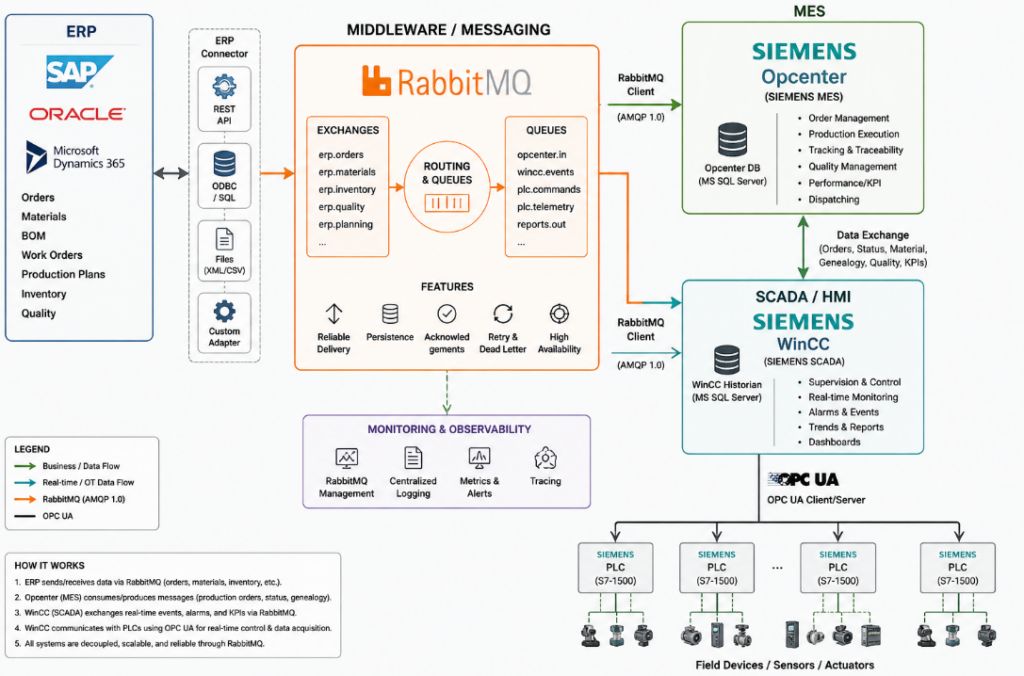
6
Key Responsibilities
- Production planning
- Order tracking
- Quality control
- Traceability
- Reporting and analytics
SCADA vs MES – Core Difference
The simplest way to understand it:
- SCADA controls machines
- MES manages production
Comparison Table
| Feature | SCADA | MES |
|---|---|---|
| Level | Shop floor | Production management |
| Focus | Real-time control | Process optimization |
| Data | Raw signals | Processed information |
| Users | Operators | Managers, planners |
| Response time | Milliseconds | Seconds / minutes |
Real Production Flow


6
Typical Flow
- PLC collects machine data
- SCADA monitors and controls machines
- MES processes production data
- ERP handles business decisions
Example Scenario
Without MES
- SCADA shows machine temperature
- Operator reacts manually
- No production tracking
With MES
- SCADA sends data to MES
- MES detects deviation
- MES triggers workflow
- Production is adjusted automatically
.NET Integration Example
In modern systems, .NET often sits between SCADA and MES.
Example Flow:
SCADA → OPC UA → .NET Service → MES → Database
Sample C# Service
public class ProductionService
{
    public void ProcessData(double temperature)
    {
        if (temperature > 80)
        {
            Console.WriteLine("Warning: High temperature");            // send event to MES
            SendToMes("HIGH_TEMP");
        }
    }    private void SendToMes(string eventCode)
    {
        Console.WriteLine($"MES Event: {eventCode}");
    }
}When to Use SCADA
Use SCADA when you need:
- Real-time monitoring
- Machine control
- Visualization dashboards
- Alarm systems
When to Use MES
Use MES when you need:
- Production tracking
- Workflow automation
- Quality management
- Reporting
Why You Need Both
SCADA and MES are not competitors — they complement each other.
Without SCADA:
- No real-time data
Without MES:
- No production intelligence
Modern Architecture (SCADA + MES + Cloud)


5
Modern Stack
- PLC → SCADA
- SCADA → OPC UA
- .NET → Message Broker
- MES → Microservices
- Cloud → Analytics
Common Mistakes
1. Using SCADA as MES
SCADA is not designed for workflow management.
2. Ignoring Integration Layer
Always introduce:
- API layer
- Messaging (RabbitMQ)
3. Tight Coupling
Avoid direct SCADA → MES connections.
Best Practices
- Use OPC UA as integration layer
- Introduce event-driven architecture
- Separate responsibilities clearly
- Scale MES independently
Conclusion
Understanding SCADA vs MES is fundamental for designing industrial systems.
- SCADA = control layer
- MES = management layer
When combined properly, they create a scalable, modern industrial architecture.
References
https://opcfoundation.org
https://docs.industrial-operations-x.siemens.cloud/r/en-us/v2.0/industrial-information-hub/manage-data/working-with-an-opc-ua-model/basics-of-the-opc-ua-model/opc-ua-modelhttps://www.rockwellautomation.com/en-us.html
More Info
We implement this in real production systems.
If you need help → contact us