Introduction
Integrating PLC (Programmable Logic Controller) systems with .NET applications is a common requirement in modern industrial environments. As production lines become increasingly connected, companies need reliable ways to collect real-time data, monitor machine states, and integrate operational technology (OT) with business systems such as MES (Manufacturing Execution Systems) and ERP (Enterprise Resource Planning).
In this architecture, .NET often serves as an integration layer between PLC devices and higher-level software systems. It acts as a bridge that translates low-level industrial signals into structured, usable data that can drive analytics, dashboards, and decision-making processes.
This article explains how PLC integration with .NET works, when to use it, and how to implement a simple but extensible solution using OPC UA.
Why Integrate PLC with .NET?
Before diving into implementation details, it’s important to understand the value behind this integration.
PLC systems control machines at the lowest level. They manage signals, actuators, motors, and sensors. However, PLCs are not designed for:
- data analytics
- user interfaces
- cloud communication
- enterprise integration
This is where .NET comes in.
A .NET application can:
- collect real-time telemetry from PLCs
- process and transform data
- store information in databases
- expose APIs for other systems
- integrate with MES, ERP, or cloud platforms
In short, it allows you to connect the production floor with business logic.
Typical Architecture
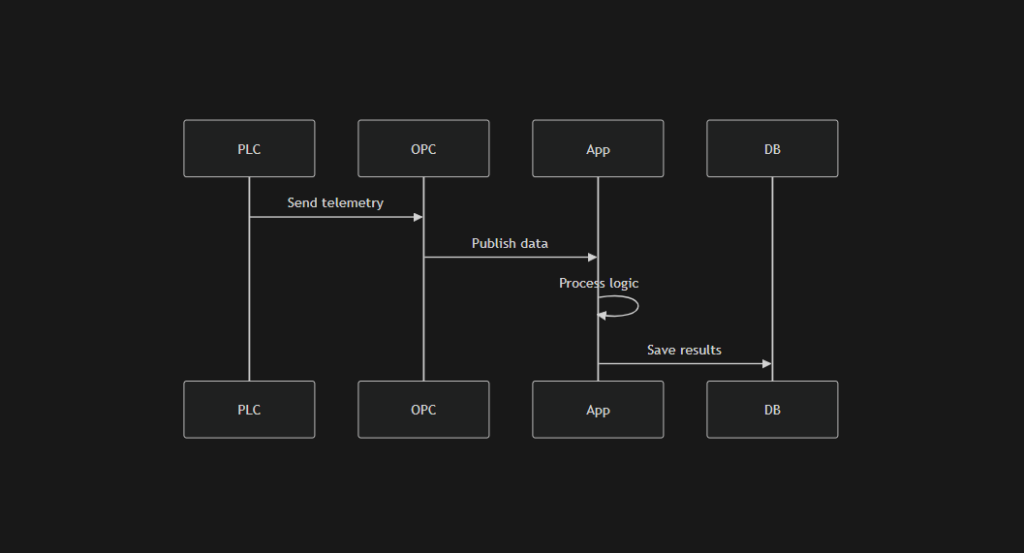
A standard PLC → .NET integration setup looks like this:
- PLC collects raw data (temperature, speed, pressure, status flags)
- OPC UA server exposes this data in a standardized way
- .NET application connects to OPC UA
- .NET processes and stores the data
- external systems (dashboards, MES, ERP) consume it
This creates a clean separation between:
- control layer (PLC)
- communication layer (OPC UA)
- application layer (.NET)
Data Flow Overview
Why OPC UA?
There are multiple ways to communicate with PLCs, including proprietary drivers and fieldbus protocols. However, OPC UA has become the de facto standard in modern industrial systems.
Key advantages of OPC UA:
- platform-independent communication
- strong security (encryption, certificates)
- standardized data modeling
- vendor-neutral (Siemens, Beckhoff, etc.)
- scalable from local to cloud environments
For .NET developers, OPC UA is especially convenient due to available libraries and strong ecosystem support.
Implementation with .NET
Let’s walk through a simple example that reads data from a PLC using OPC UA.
Step 1: Install OPC UA Client Package
Run:
dotnet add package OPCFoundation.NetStandard.Opc.UaStep 2: Simple C# Example
using Opc.Ua;
using Opc.Ua.Client;
using Opc.Ua.Configuration;

public class PlcReader
{
    public async Task ReadPlcValue()
    {
        var config = new ApplicationConfiguration
        {
            ApplicationName = "SimpleClient",
            ApplicationType = ApplicationType.Client,
            SecurityConfiguration = new SecurityConfiguration
            {
                AutoAcceptUntrustedCertificates = true
            },
            ClientConfiguration = new ClientConfiguration()
        };
        await config.Validate(ApplicationType.Client);
        var endpoint = CoreClientUtils.SelectEndpoint("opc.tcp://localhost:4840", false);
        var session = await Session.Create(
            config,
            new ConfiguredEndpoint(null, endpoint, EndpointConfiguration.Create(config)),
            false,
            "session",
            60000,
            null,
            null);
        var value = session.ReadValue("ns=2;s=Temperature");
        Console.WriteLine($"Temperature: {value.Value}");
    }
}What This Code Does
This example shows the minimum viable integration:
- Configures OPC UA client
- Connects to an OPC UA endpoint
- Creates a session
- Reads a value from a PLC node
- Outputs the result
Even though the example is simple, it demonstrates the core concept:
reading real-time industrial data into a .NET application.
Extending the Example
In real-world systems, you rarely read a single value once. Instead, you build a continuous pipeline.
Typical extensions include:
- polling multiple nodes
- subscribing to value changes (event-based)
- storing data in a database
- exposing REST APIs
- sending alerts or notifications
For example, instead of ReadValue, you can use subscriptions to receive updates automatically when values change.
Real-Time Data Processing
One of the main reasons to integrate PLC with .NET is real-time processing.
Common use cases:
- monitoring machine status
- detecting anomalies
- tracking production metrics
- calculating KPIs (OEE, throughput)
- triggering business workflows
A typical pattern is:
- PLC sends raw signals
- .NET interprets them
- system derives meaningful insights
For example:
- raw signal: motor speed = 0
- interpreted event: machine stopped
Database Integration
Once data is collected, it is usually stored for:
- historical analysis
- reporting
- auditing
- machine learning
Common database choices:
- SQL Server
- PostgreSQL
- time-series databases (InfluxDB, TimescaleDB)
A simple approach is:
- read values
- map to domain model
- persist in database
Integration with MES and ERP
A key benefit of using .NET is the ability to integrate with enterprise systems.
Examples:
- sending production data to MES
- updating orders in ERP
- synchronizing machine states
- linking production with business KPIs
Without this integration, production data stays isolated.
With integration, it becomes actionable business intelligence.
Performance Considerations
Industrial systems often run 24/7 and handle large volumes of data.
Important factors:
1. Connection stability
- handle reconnection logic
- detect broken sessions
2. Throughput
- avoid blocking operations
- use async programming
3. Data volume
- batch writes to database
- avoid writing every millisecond
4. Scalability
- use background services
- consider message queues (RabbitMQ, Kafka)
Common Pitfalls
1. Polling too frequently
Reading values too often can overload the PLC or network.
2. Ignoring security
OPC UA supports certificates — use them in production.
3. Tight coupling
Do not embed business logic directly in PLC communication layer.
4. No error handling
Industrial systems must be fault-tolerant.
Recommended Architecture
For production systems, consider:
- PLC layer – machine control
- OPC UA layer – communication
- .NET service layer – processing
- database layer – storage
- API layer – external access
Optionally:
- message broker (for decoupling)
- monitoring system (Prometheus, Grafana)
When to Use .NET + OPC UA
This approach works best when:
- you need real-time production data
- you integrate PLC with MES / ERP
- you build dashboards or monitoring tools
- you require scalable architecture
- you want vendor-independent communication
It is less suitable when:
- system is extremely simple
- direct PLC logic is sufficient
- latency requirements are ultra-critical (microseconds)
Example Use Cases
1. Production Monitoring Dashboard
Real-time visualization of machine states.
2. Predictive Maintenance
Analyzing sensor data to detect failures early.
3. Quality Control Systems
Tracking parameters like temperature or pressure.
4. Energy Monitoring
Measuring consumption across production lines.
Security Considerations
Industrial systems are increasingly connected, which introduces risks.
Best practices:
- use OPC UA security (certificates)
- isolate networks (OT vs IT)
- secure APIs (authentication, authorization)
- log all access and operations
Scaling the Solution
As systems grow, you may need:
- multiple PLC connections
- distributed services
- cloud integration
- high availability
At this stage, consider:
- microservices architecture
- event-driven systems
- edge + cloud hybrid setups
Conclusion
Using .NET as an integration layer for PLC systems is a practical and scalable way to connect production lines with modern software.
Even a simple setup — like reading a single value from OPC UA — can evolve into a full industrial platform that:
- collects real-time data
- processes business logic
- integrates with enterprise systems
- supports analytics and decision-making
For companies building modern manufacturing systems, this architecture is not just useful — it is essential.
Call to Action
If you are building industrial systems, integrating PLCs, or connecting production data with enterprise software:
👉 Explore our /industrial-software-development services
👉 or contact us to discuss your use case
Where .NET Fits in an Industrial Architecture
A production system usually has several layers:
- PLC layer – controls machines, sensors, motors, valves, and actuators
- SCADA / HMI layer – operator screens, alarms, visualization, process overview
- Integration layer – middleware, custom services, APIs
- Business systems – MES, ERP, reporting, planning, analytics
The .NET application usually sits between the industrial communication layer and the business layer.
Typical responsibilities of the .NET layer include:
- reading process values from PLCs
- transforming raw telemetry into business events
- persisting data in SQL databases
- exposing REST APIs
- feeding dashboards and reports
- sending alarms or notifications
- integrating production data with MES or ERP
This makes .NET a strong choice for industrial software, especially when companies need custom workflows beyond what a standard SCADA package provides.
How It Works
In this setup:
- the PLC controls the machine
- the OPC UA layer exposes industrial variables
- the .NET application consumes and interprets them
- the database stores history and audit data
- SCADA visualizes the process for operators
SCADA and .NET – What Is the Difference?
SCADA stands for Supervisory Control and Data Acquisition. Its primary role is to give operators visibility into a production process.
A SCADA system usually handles:
- process visualization
- alarms and acknowledgments
- trends and history
- operator commands
- machine overview screens
However, SCADA is not always enough when you need:
- integration with ERP or MES
- custom reporting logic
- advanced analytics
- cloud communication
- complex APIs
- user-specific business workflows
This is where a .NET application becomes valuable.
Practical division of responsibilities
SCADA is best for:
- live visualization
- operator interaction
- alarms
- historical trends
.NET is best for:
- integration
- business rules
- custom services
- APIs
- reporting
- database processing
- external system communication
In many real systems, the best solution is not “SCADA or .NET” but SCADA plus .NET.
Siemens and OPC UA in Practice
In Siemens-heavy environments, it is common to see:
- Siemens PLC controlling the machine
- OPC UA used as the communication interface
- SCADA or HMI used for operations
- .NET service used for custom integration
This is attractive because Siemens equipment is common in manufacturing, and OPC UA makes the integration more standardized than proprietary point-to-point communication.
In practical terms, the Siemens side exposes data such as:
- temperatures
- line speed
- cycle state
- alarm bits
- production counters
- quality flags
The .NET side reads these variables and turns them into useful application data.
Examples:
- raw PLC value:
CurrentSpeed = 85 - application meaning: machine running in normal range
- raw PLC value:
AlarmCode = 1024 - application meaning: conveyor overload alarm active
- raw PLC bit:
BatchCompleted = true - application meaning: close production record and update MES
Why OPC UA Is a Good Choice
OPC UA is widely used because it offers:
- vendor-neutral communication
- structured data access
- secure sessions
- subscriptions for change-based updates
- support for industrial interoperability
Compared with manually parsing vendor-specific data, OPC UA gives you a cleaner integration layer and makes it easier to scale the application later.
Install the OPC UA Package
Use:
dotnet add package OPCFoundation.NetStandard.Opc.UaExample 1: Read a Single PLC Value
This is the simplest starting point.
using Opc.Ua;
using Opc.Ua.Client;
using Opc.Ua.Configuration;public class PlcReader
{
    public async Task ReadTemperatureAsync()
    {
        var config = new ApplicationConfiguration
        {
            ApplicationName = "SimpleClient",
            ApplicationType = ApplicationType.Client,
            SecurityConfiguration = new SecurityConfiguration
            {
                AutoAcceptUntrustedCertificates = true
            },
            ClientConfiguration = new ClientConfiguration()
        };
        await config.Validate(ApplicationType.Client);
        var endpoint = CoreClientUtils.SelectEndpoint("opc.tcp://localhost:4840", false);
        using var session = await Session.Create(
            config,
            new ConfiguredEndpoint(null, endpoint, EndpointConfiguration.Create(config)),
            false,
            "session",
            60000,
            null,
            null);
        var value = session.ReadValue("ns=2;s=Temperature");
        Console.WriteLine($"Temperature: {value.Value}");
    }
}This example is useful for:
- connectivity tests
- proof of concept
- verifying node paths
- first-stage diagnostics
Example 2: Read Multiple PLC Values
In real projects, you usually need more than one variable.
using Opc.Ua;
using Opc.Ua.Client;
using Opc.Ua.Configuration;public class PlcMultiReader
{
    public async Task ReadMachineSnapshotAsync()
    {
        var config = new ApplicationConfiguration
        {
            ApplicationName = "MultiReader",
            ApplicationType = ApplicationType.Client,
            SecurityConfiguration = new SecurityConfiguration
            {
                AutoAcceptUntrustedCertificates = true
            },
            ClientConfiguration = new ClientConfiguration()
        };
        await config.Validate(ApplicationType.Client);
        var endpoint = CoreClientUtils.SelectEndpoint("opc.tcp://localhost:4840", false);
        using var session = await Session.Create(
            config,
            new ConfiguredEndpoint(null, endpoint, EndpointConfiguration.Create(config)),
            false,
            "machine-snapshot",
            60000,
            null,
            null);
        var temperature = session.ReadValue("ns=2;s=Temperature");
        var speed = session.ReadValue("ns=2;s=LineSpeed");
        var machineState = session.ReadValue("ns=2;s=MachineState");
        var alarmActive = session.ReadValue("ns=2;s=AlarmActive");
        Console.WriteLine($"Temperature: {temperature.Value}");
        Console.WriteLine($"Line Speed: {speed.Value}");
        Console.WriteLine($"Machine State: {machineState.Value}");
        Console.WriteLine($"Alarm Active: {alarmActive.Value}");
    }
}This pattern is useful when building:
- machine dashboards
- line status panels
- production monitoring screens
Example 3: Map Raw PLC Data to a Domain Model
Industrial integration becomes more useful when raw values are converted into application objects.
public class MachineSnapshot
{
    public double Temperature { get; set; }
    public double LineSpeed { get; set; }
    public string MachineState { get; set; } = string.Empty;
    public bool AlarmActive { get; set; }
    public DateTime TimestampUtc { get; set; }
}using Opc.Ua;
using Opc.Ua.Client;
using Opc.Ua.Configuration;public class PlcSnapshotService
{
public async Task<MachineSnapshot> ReadSnapshotAsync()
{
var config = new ApplicationConfiguration
{
ApplicationName = "SnapshotReader",
ApplicationType = ApplicationType.Client,
SecurityConfiguration = new SecurityConfiguration
{
AutoAcceptUntrustedCertificates = true
},
ClientConfiguration = new ClientConfiguration()
};
await config.Validate(ApplicationType.Client);
var endpoint = CoreClientUtils.SelectEndpoint("opc.tcp://localhost:4840", false);
using var session = await Session.Create(
config,
new ConfiguredEndpoint(null, endpoint, EndpointConfiguration.Create(config)),
false,
"snapshot-session",
60000,
null,
null);
return new MachineSnapshot
{
Temperature = Convert.ToDouble(session.ReadValue("ns=2;s=Temperature").Value),
LineSpeed = Convert.ToDouble(session.ReadValue("ns=2;s=LineSpeed").Value),
MachineState = Convert.ToString(session.ReadValue("ns=2;s=MachineState").Value) ?? "Unknown",
AlarmActive = Convert.ToBoolean(session.ReadValue("ns=2;s=AlarmActive").Value),
TimestampUtc = DateTime.UtcNow
};
}
}This is the point where your application becomes more than a connector. It starts building a real software model of the production process.
Example 4: Poll PLC Data in a Background Service
A practical industrial application usually runs continuously. In .NET, a good way to implement that is a BackgroundService.
using Microsoft.Extensions.Hosting;
using Microsoft.Extensions.Logging;public class PlcPollingWorker : BackgroundService
{
    private readonly PlcSnapshotService _snapshotService;
    private readonly ILogger<PlcPollingWorker> _logger;

    public  PlcPollingWorker(PlcSnapshotService snapshotService, ILogger<PlcPollingWorker> logger)
    {
        _snapshotService = snapshotService;
        _logger = logger;
    }
    protected override async Task ExecuteAsync(CancellationToken stoppingToken)
    {
        while (!stoppingToken.IsCancellationRequested)
        {
            try
            {
                var snapshot = await _snapshotService.ReadSnapshotAsync();
                _logger.LogInformation(
                    "PLC Snapshot | Temp: {Temp} | Speed: {Speed} | State: {State} | Alarm{Alarm}",
                    snapshot.Temperature,
                    snapshot.LineSpeed,
                    snapshot.MachineState,
                    snapshot.AlarmActive);
                    await Task.Delay(TimeSpan.FromSeconds(2), stoppingToken);
            }
            catch (Exception ex)
            {
                _logger.LogError(ex, "Error while polling PLC data.");
                await Task.Delay(TimeSpan.FromSeconds(5), stoppingToken);
            }
        }
    }
}This approach is common in:
- Windows services
- Linux services
- edge gateways
- plant-side integration nodes
Example 5: Save PLC Results to SQL Server
Once you read process data, you often want to persist it.
SQL table example
CREATE TABLE MachineSnapshots
(
    Id INT IDENTITY(1,1) PRIMARY KEY,
    Temperature FLOAT NOT NULL,
    LineSpeed FLOAT NOT NULL,
    MachineState NVARCHAR(100) NOT NULL,
    AlarmActive BIT NOT NULL,
    TimestampUtc DATETIME2 NOT NULL
);C# using ADO.NET
using System.Data.SqlClient;public class SnapshotRepository
{
    private readonly string _connectionString;    public SnapshotRepository(string connectionString)
    {
        _connectionString = connectionString;
    }    public async Task SaveAsync(MachineSnapshot snapshot)
    {
        const string sql = @"
            INSERT INTO MachineSnapshots
            (
                Temperature,
                LineSpeed,
                MachineState,
                AlarmActive,
                TimestampUtc
            )
            VALUES
            (
                @Temperature,
                @LineSpeed,
                @MachineState,
                @AlarmActive,
                @TimestampUtc
            )";        await using var connection = new SqlConnection(_connectionString);
        await connection.OpenAsync();        await using var command = new SqlCommand(sql, connection);
        command.Parameters.AddWithValue("@Temperature", snapshot.Temperature);
        command.Parameters.AddWithValue("@LineSpeed", snapshot.LineSpeed);
        command.Parameters.AddWithValue("@MachineState", snapshot.MachineState);
        command.Parameters.AddWithValue("@AlarmActive", snapshot.AlarmActive);
        command.Parameters.AddWithValue("@TimestampUtc", snapshot.TimestampUtc);
        await command.ExecuteNonQueryAsync();
    }
}This is enough to start building:
- trend history
- machine event history
- production reports
- audit trails
Example 6: Trigger Business Logic from PLC State
A strong reason to use .NET is not only reading values, but also applying business rules.
public class MachineStateInterpreter
{
    public string Interpret(MachineSnapshot snapshot)
    {
        if (snapshot.AlarmActive)
            return "Alarm";        if (snapshot.LineSpeed <= 0)
            return "Stopped";        if (snapshot.Temperature > 90)
            return "Overheating";        return "Running";
    }
}This is where industrial telemetry becomes operational meaning.
Raw value:
LineSpeed = 0
Business interpretation:
Machine stopped unexpectedly
That interpretation can then:
- update SCADA status
- create an alarm
- send a notification
- update MES downtime records
Example 7: Subscribe to Value Changes Instead of Polling
Polling is simple, but subscriptions are often better when you want faster reaction and lower load.
using Opc.Ua;
using Opc.Ua.Client;
using Opc.Ua.Configuration;public class PlcSubscriptionExample
{
    public async Task SubscribeAsync()
    {
        var config = new ApplicationConfiguration
        {
            ApplicationName = "SubscriptionClient",
            ApplicationType = ApplicationType.Client,
            SecurityConfiguration = new SecurityConfiguration
            {
                AutoAcceptUntrustedCertificates = true
            },
            ClientConfiguration = new ClientConfiguration()
        };
        await config.Validate(ApplicationType.Client);
        var endpoint = CoreClientUtils.SelectEndpoint("opc.tcp://localhost:4840", false);
        var session = await Session.Create(
            config,
            new ConfiguredEndpoint(null, endpoint, EndpointConfiguration.Create(config)),
            false,
            "subscription-session",
            60000,
            null,
            null);
            var subscription = new Subscription(session.DefaultSubscription)
            {
                PublishingInterval = 1000
            };
            var item = new MonitoredItem(subscription.DefaultItem)
            {
                DisplayName = "Temperature",
                StartNodeId = "ns=2;s=Temperature",
                SamplingInterval = 1000
            };        item.Notification += (monitoredItem, args) =>
            {
            foreach (var value in monitoredItem.DequeueValues())
            {
                Console.WriteLine($"Temperature changed: {value.Value}");
            }
        };
        subscription.AddItem(item);
        session.AddSubscription(subscription);
        subscription.Create();
        Console.WriteLine("Subscription created. Press Enter to exit.");
        Console.ReadLine();
    }
}Subscriptions are useful when:
- you want event-style updates
- data changes are important
- constant polling is wasteful
SCADA Integration Scenarios
A SCADA system may already provide:
- alarms
- trends
- machine visualization
So why add .NET?
Because .NET can provide capabilities SCADA often does not handle elegantly, such as:
- integration with external databases
- advanced API layers
- role-based web applications
- multi-plant reporting
- integration with cloud platforms
- custom workflow automation
Example architecture
- PLC controls machine
- SCADA shows machine state to operators
- .NET service reads the same process values
- .NET pushes data to SQL, MES, and ERP
- management dashboards use API data, not only SCADA screens
In this way, SCADA remains the operator tool, while .NET becomes the integration and business logic engine.
Siemens Use Cases
In Siemens-based industrial systems, common integration targets include:
- machine counters
- recipe values
- line speed
- alarm words
- machine mode
- temperature or pressure measurements
- quality result flags
A Siemens PLC may drive the equipment, while OPC UA exposes the data and .NET provides:
- reporting
- batch traceability
- order synchronization
- maintenance dashboards
- line efficiency calculations
This is especially valuable in automotive, packaging, food production, and general manufacturing.
Performance and Reliability Considerations
Industrial systems require more than code that “works on my machine.”
1. Reconnection strategy
Networks fail. Sessions drop. Your service must reconnect cleanly.
2. Controlled sampling
Do not read everything every 100 ms unless you truly need it.
3. Buffering and batching
For high data volume, batch inserts instead of writing every single event separately.
4. Separation of concerns
Keep:
- OPC communication
- business logic
- database access
- API layer
as separate components.
5. Logging and diagnostics
A production integration service should log:
- connection state
- node read failures
- reconnect attempts
- processing errors
- persistence errors
Common Mistakes
Using the PLC as a business server
PLCs should control machines, not replace application logic.
Reading too many values too frequently
This creates unnecessary load.
Mixing SCADA responsibilities with integration logic
SCADA is not always the right place for complex enterprise workflows.
Ignoring security
OPC UA security should be configured properly in production.
No domain model
If your app only forwards raw values, it becomes hard to scale and maintain.
When to Use This Approach
Use .NET + OPC UA + PLC integration when:
- you need real-time production data
- you integrate industrial data with business systems
- you want custom dashboards or APIs
- you need reporting or traceability
- you want to complement SCADA with business logic
- you work in environments with Siemens or similar industrial platforms
Conclusion
Integrating PLC systems with .NET is one of the most practical ways to connect industrial processes with modern software. PLCs remain focused on deterministic machine control, while .NET provides the flexibility required for analytics, APIs, persistence, reporting, and enterprise integration.
In many industrial projects, OPC UA becomes the standard bridge between the automation layer and the software layer. In Siemens-based environments, this pattern is especially common: Siemens PLCs drive the process, OPC UA exposes the data, SCADA supports operators, and .NET adds the business and integration capabilities that modern production systems need.
Even a small prototype that reads one node can evolve into a full industrial platform with:
- real-time telemetry
- SQL persistence
- SCADA integration
- MES / ERP connectivity
- dashboards and reporting
- advanced event processing
That is why .NET remains such a strong choice for industrial software development.
References
https://en.wikipedia.org/wiki/SCADA
https://www.siemens.com/en-us/products/opc-ua
More Info
We implement this in real production systems.
If you need help → contact us