MAUI Trading App. Modern desktop trading applications require three things:
- fast UI rendering
- local persistent storage
- responsive charts and real-time updates
Many developers immediately jump into:
- WPF
- Electron
- React + Tauri
- Avalonia
But for smaller trading dashboards and cross-platform financial tools, .NET MAUI is a surprisingly strong option.
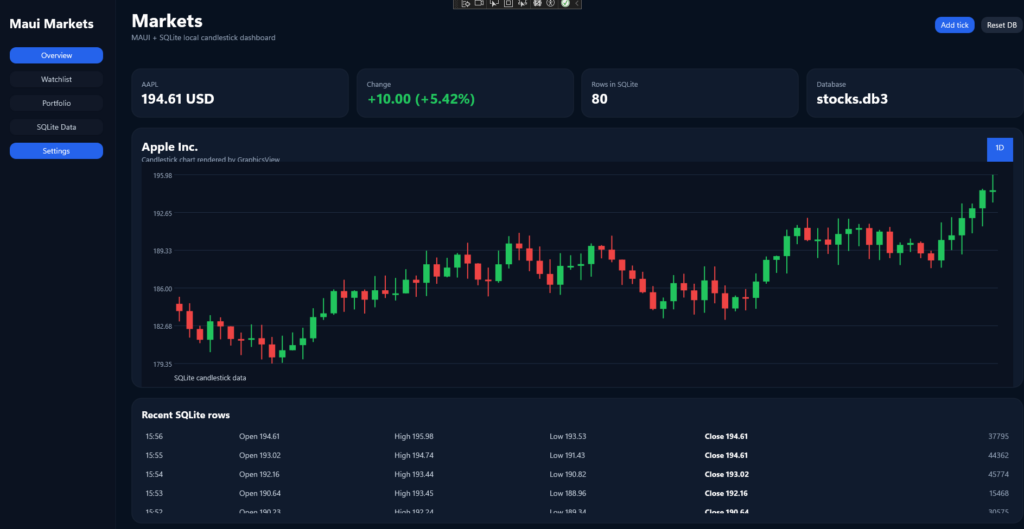
We built a desktop stock application that:
- stores market data in SQLite
- renders charts
- displays financial information
- uses modern dark UI
- works as a desktop trading dashboard foundation
This article explains the architecture step by step.
Why SQLite for Desktop Financial Apps?
For desktop trading software, SQLite is often a better choice than SQL Server.
Why?
Because:
- zero configuration
- embedded database
- no server installation
- fast reads
- portable single-file database
For local dashboards, watchlists, indicators, and chart caching, SQLite is ideal.
Typical architecture:
Market API
    ↓
Background Service
    ↓
SQLite
    ↓
Chart Renderer
    ↓
Desktop UI
MAUI Trading App. Application Architecture
The application uses a layered structure.
MauiStockApp1
│
├── Models
├── Services
├── Views
├── Database
├── Charts
└── Platforms
This separation matters.
Most small MAUI apps become a disaster because developers put:
- database logic
- UI
- chart rendering
- API calls
inside MainPage.xaml.cs.
That scales horribly.
MAUI Trading App. Main UI Structure
The dashboard uses a desktop trading layout:
┌────────────────────────────────────────────┐
│ Toolbar                                    │
├──────────────┬─────────────────────────────┤
│ Watchlist    │ Candlestick Chart           │
│              │                             │
│ Symbols      │ Indicators                  │
│              │                             │
├──────────────┴─────────────────────────────┤
│ Market Statistics                          │
└────────────────────────────────────────────┘
This is much better than fake MDI windows.
A common mistake is trying to recreate WinForms inside MAUI.
That usually becomes technical debt immediately.
SQLite Setup
Install package:
dotnet add package sqlite-net-pclDatabase service:
using SQLite;

public class StockDatabase
{
    private SQLiteAsyncConnection _database;

    public async Task Init()
    {
        if (_database != null)
            return;

        var path = Path.Combine(
            FileSystem.AppDataDirectory,
            "stocks.db");

        _database = new SQLiteAsyncConnection(path);

        await _database.CreateTableAsync<StockPrice>();
    }

    public Task<List<StockPrice>> GetPrices()
    {
        return _database.Table<StockPrice>()
            .OrderBy(x => x.Time)
            .ToListAsync();
    }

    public Task<int> Insert(StockPrice price)
    {
        return _database.InsertAsync(price);
    }
}Stock Model
public class StockPrice
{
    [PrimaryKey, AutoIncrement]
    public int Id { get; set; }

    public string Symbol { get; set; }

    public decimal Price { get; set; }

    public DateTime Time { get; set; }
}Simple.
Good.
Enough.
Most developers overengineer financial models immediately.
Registering Services in MAUI
MauiProgram.cs
builder.Services.AddSingleton<StockDatabase>();
builder.Services.AddSingleton<MainPage>();This allows dependency injection.
Without DI, large MAUI apps become impossible to maintain.
Loading Data
MainPage.xaml.cs
public partial class MainPage : ContentPage
{
    private readonly StockDatabase _database;

    public MainPage(StockDatabase database)
    {
        InitializeComponent();

        _database = database;

        LoadData();
    }

    private async Task LoadData()
    {
        await _database.Init();

        var prices = await _database.GetPrices();

        chartView.ItemsSource = prices;
    }
}MAUI Trading App. Creating Charts in MAUI
There are multiple approaches.
Option 1 — GraphicsView (recommended)
Best for:
- custom rendering
- trading dashboards
- candlestick charts
- lightweight rendering
Option 2 — Syncfusion
Good but heavy.
Option 3 — LiveCharts
Works but often breaks between MAUI versions.
For trading software, custom rendering is usually the best choice.
Custom Chart Renderer
public class StockChartDrawable : IDrawable
{
    public List<StockPrice> Prices { get; set; } = new();

    public void Draw(ICanvas canvas, RectF dirtyRect)
    {
        canvas.StrokeColor = Colors.Lime;
        canvas.StrokeSize = 2;

        if (Prices.Count < 2)
            return;

        float stepX = dirtyRect.Width / Prices.Count;

        decimal max = Prices.Max(x => x.Price);
        decimal min = Prices.Min(x => x.Price);

        for (int i = 1; i < Prices.Count; i++)
        {
            float x1 = (i - 1) * stepX;
            float x2 = i * stepX;

            float y1 = dirtyRect.Height -
                ((float)(Prices[i - 1].Price - min)
                / (float)(max - min))
                * dirtyRect.Height;

            float y2 = dirtyRect.Height -
                ((float)(Prices[i].Price - min)
                / (float)(max - min))
                * dirtyRect.Height;

            canvas.DrawLine(x1, y1, x2, y2);
        }
    }
}GraphicsView
XAML:
<GraphicsView
    x:Name="ChartView"
HeightRequest="400" />Code:
var drawable = new StockChartDrawable
{
    Prices = prices
};

ChartView.Drawable = drawable;

ChartView.Invalidate();Dark Trading UI
Financial applications look terrible if spacing and contrast are wrong.
Recommended colors:
Background: #101014
Card:       #1B1B22
Green:      #00C853
Red:        #FF5252
Text:       #F5F5F5
Avoid:
- pure black
- neon everywhere
- giant gradients
- rounded corners on everything
Most fake “modern fintech UI” looks childish.
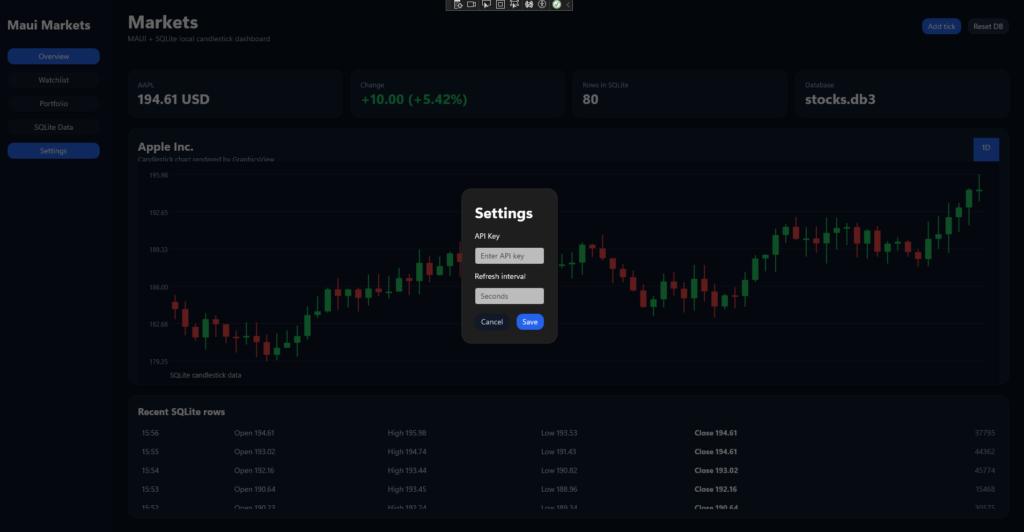
Modal Settings Panel
Instead of WinForms dialogs:
ShowDialog()use overlay panels.
Example:
<Grid x:Name="SettingsOverlay"
      IsVisible="False"
      BackgroundColor="#99000000">

    <Border
        MaximumWidthRequest="600"
        HorizontalOptions="Center"
        VerticalOptions="Center">

        <!-- settings -->

    </Border>

</Grid>This is cleaner and works much better in MAUI.
Maximizing Window on Startup
MAUI desktop apps often start tiny.
Use:
protected override Window CreateWindow(IActivationState? state)
{
    var window = new Window(new AppShell());

#if WINDOWS
    window.Created += (s, e) =>
    {
        var nativeWindow =
            window.Handler.PlatformView
            as Microsoft.UI.Xaml.Window;

        IntPtr hWnd =
            WinRT.Interop.WindowNative
                .GetWindowHandle(nativeWindow);

        var windowId =
            Microsoft.UI.Win32Interop
                .GetWindowIdFromWindow(hWnd);

        var appWindow =
            Microsoft.UI.Windowing.AppWindow
                .GetFromWindowId(windowId);

        appWindow.SetPresenter(
            Microsoft.UI.Windowing
                .AppWindowPresenterKind
                .Overlapped);

        if (appWindow.Presenter is
            Microsoft.UI.Windowing
                .OverlappedPresenter presenter)
        {
            presenter.Maximize();
        }
    };
#endif

    return window;
}Why MAUI Is Not Perfect
Brutal truth:
MAUI is still unstable for advanced desktop software.
Problems:
- Windows App SDK issues
- broken manifests
- workload version conflicts
- chart libraries breaking
- platform inconsistencies
But for:
- dashboards
- internal enterprise tools
- monitoring apps
- financial visualizations
- trading panels
it is already usable.
When NOT to Use MAUI
Do not use MAUI for:
- Bloomberg Terminal clones
- SCADA with 40 floating windows
- CAD software
- heavy desktop tooling
- Visual Studio style UI
Use:
- WPF
- Avalonia
- Qt
instead.
Future Improvements
This project can easily evolve into:
- live market feeds
- WebSocket streaming
- candlestick charts
- RSI/MACD indicators
- watchlists
- portfolio management
- alerts
- paper trading
- AI analysis
Architecture already supports that direction.
Conclusion
MAUI Trading App. This MAUI stock dashboard project demonstrates something important:
You do not need:
- Electron
- Chromium
- massive frontend stacks
to build modern desktop financial applications.
A lightweight MAUI + SQLite architecture can already deliver:
- fast startup
- native desktop experience
- local persistence
- modern UI
- scalable architecture
Source
https://github.com/rafalkukuczka/MauiStockApp1
References
https://learn.microsoft.com/en-us/samples/dotnet/maui-samples/xaml-fundamentals
More Info
We implement this in real production systems.
If you need help → contact us