Introduction
SQL Server index types are one of the most important topics in database performance tuning. A well-designed index can make a query run much faster. A poorly designed index can slow down inserts, updates and deletes.
In Microsoft SQL Server, an index is a data structure that helps the database engine find rows more efficiently. Without an index, SQL Server may need to scan the whole table. With the right index, SQL Server can often find the required rows directly.
This article explains the most important SQL Server index types, including clustered indexes, nonclustered indexes, unique indexes, filtered indexes, columnstore indexes, XML indexes, spatial indexes, full-text indexes and memory-optimized indexes.
What Is an Index in SQL Server?
An index in SQL Server works like an index in a book. Instead of reading every page, you use the index to find the topic quickly.
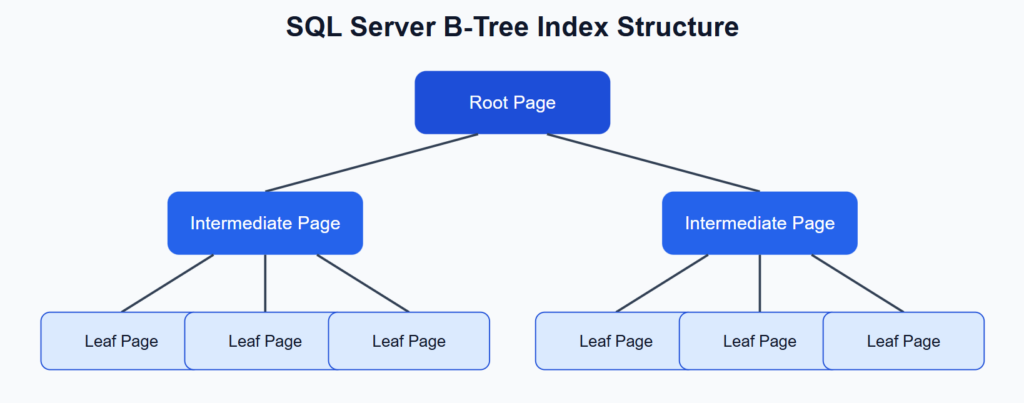
In database terms, an index helps SQL Server locate rows without scanning the entire table. Most traditional SQL Server indexes use a B-tree structure. This structure allows SQL Server to move from the root level to intermediate pages and then to the leaf level, where the indexed data or row references are stored.
Main SQL Server Index Types
SQL Server supports several index types. Each type is designed for a different workload.
The most common SQL Server index types are:
- Clustered index
- Nonclustered index
- Unique index
- Composite index
- Covering index
- Filtered index
- Columnstore index
- XML index
- Spatial index
- Full-text index
- Memory-optimized index
The best index depends on the query pattern, table size, data distribution and write frequency.
Clustered Index in SQL Server
A clustered index defines the physical order of data rows in a table. The leaf level of a clustered index contains the actual data rows.
Because a table can be physically ordered in only one way, a table can have only one clustered index.
Example:
CREATE TABLE dbo.Orders
(
    OrderId INT NOT NULL,
    CustomerId INT NOT NULL,
    OrderDate DATE NOT NULL,
    TotalAmount DECIMAL(18,2) NOT NULL,
    CONSTRAINT PK_Orders PRIMARY KEY CLUSTERED (OrderId)
);A clustered index is usually a good choice for a primary key. It is also useful for range queries.
Example:
SELECT *
FROM dbo.Orders
WHERE OrderDate BETWEEN '2026-01-01' AND '2026-01-31'
ORDER BY OrderDate;If many queries filter or sort by OrderDate, a clustered index on this column may be useful. However, the clustered key should be chosen carefully.
A good clustered key is usually:
- narrow,
- stable,
- unique,
- increasing,
- frequently used in queries.
A bad clustered key can make other indexes larger, because the clustered key is stored as a row locator in nonclustered indexes.
Nonclustered Index in SQL Server
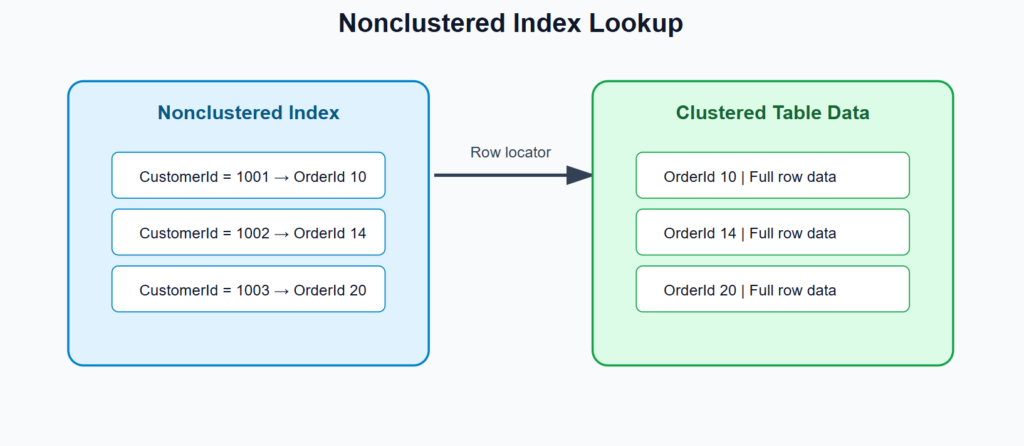
A nonclustered index is stored separately from the table data. It contains key values and a pointer to the actual row.
If the table has a clustered index, the pointer is usually the clustered key. If the table is a heap, the pointer is a row identifier.
Example:
CREATE NONCLUSTERED INDEX IX_Orders_CustomerId
ON dbo.Orders(CustomerId);This index can help a query like this:
SELECT OrderId, OrderDate, TotalAmount
FROM dbo.Orders
WHERE CustomerId = 1001;Nonclustered indexes are very common in OLTP systems. They are useful for search conditions, joins and sorting.
However, too many nonclustered indexes can slow down write operations. Every insert, update or delete may need to update multiple indexes.
Unique Index in SQL Server
A unique index prevents duplicate values in one or more columns.
Example:
CREATE UNIQUE INDEX UX_Customers_Email
ON dbo.Customers(Email);This index prevents two customers from having the same email address.
Unique indexes are useful for:
- email addresses,
- usernames,
- external IDs,
- business keys,
- natural keys.
A primary key automatically creates a unique index. However, unique indexes can also be used for other business rules.
Example:
CREATE UNIQUE INDEX UX_Products_Sku
ON dbo.Products(Sku);This ensures that each product has a unique SKU.
Composite Index in SQL Server
A composite index contains more than one key column.
Example:
CREATE NONCLUSTERED INDEX IX_Orders_CustomerId_OrderDate
ON dbo.Orders(CustomerId, OrderDate);This index is useful for queries that filter by both CustomerId and OrderDate.
SELECT *
FROM dbo.Orders
WHERE CustomerId = 1001
AND OrderDate >= '2026-01-01';Column order is very important in composite indexes.
An index on:
(CustomerId, OrderDate)is not the same as:
(OrderDate, CustomerId)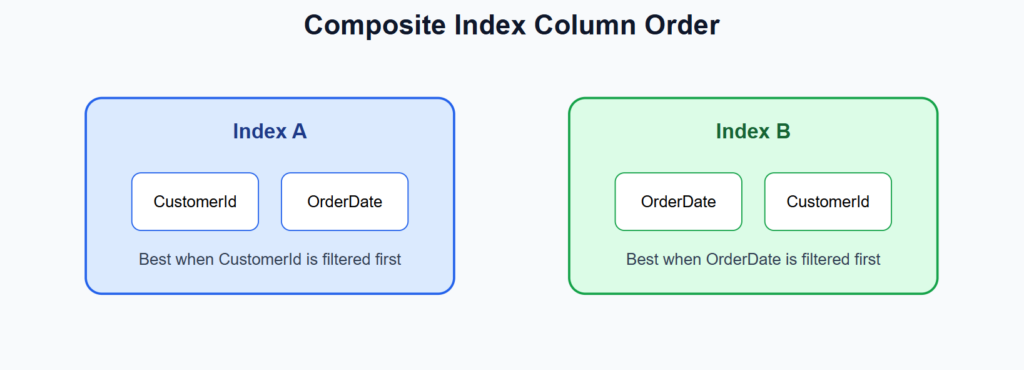
SQL Server can often use the leftmost part of a composite index. For example, an index on (CustomerId, OrderDate) can help with:
SQL Server can often use the leftmost part of a composite index. For example, an index on <code>(CustomerId, OrderDate)</code> can help with:WHERE CustomerId = 1001It can also help with:
WHERE CustomerId = 1001<br>AND OrderDate >= '2026-01-01'But it may not be ideal for:
WHERE OrderDate >= '2026-01-01'because OrderDate is not the first key column.
Covering Index with Included Columns
A covering index contains all columns required by a query. This allows SQL Server to return results directly from the index.
In SQL Server, this is often done with included columns.
Example:
CREATE NONCLUSTERED INDEX IX_Orders_CustomerId_Include<br>ON dbo.Orders(CustomerId)<br>INCLUDE (OrderDate, TotalAmount);This index can support the following query:
SELECT OrderDate, TotalAmount<br>FROM dbo.Orders<br>WHERE CustomerId = 1001;The column CustomerId is the search key. The columns OrderDate and TotalAmount are stored at the leaf level of the index.
Included columns are useful when you want to avoid key lookups.
However, covering indexes should be used carefully. If you include too many columns, the index becomes large and expensive to maintain.
Filtered Index in SQL Server
A filtered index contains only selected rows from a table. It uses a WHERE clause.
Example:
CREATE NONCLUSTERED INDEX IX_Orders_OpenOrders<br>ON dbo.Orders(CustomerId, OrderDate)<br>WHERE Status = 'Open';This index is useful when most queries target only open orders.
Example:
SELECT OrderId, OrderDate<br>FROM dbo.Orders<br>WHERE Status = 'Open'<br> AND CustomerId = 1001;Filtered indexes are useful for:
- active records,
- open orders,
- unprocessed messages,
- non-null values,
- selected statuses.
Example with non-null values:
CREATE NONCLUSTERED INDEX IX_Customers_ExternalId_NotNull
ON dbo.Customers(ExternalId)
WHERE ExternalId IS NOT NULL;A filtered index is smaller than a full-table index. It can also be cheaper to maintain.
According to Microsoft, filtered indexes can improve query performance and reduce storage and maintenance costs when queries select from a well-defined subset of data.
Columnstore Index in SQL Server
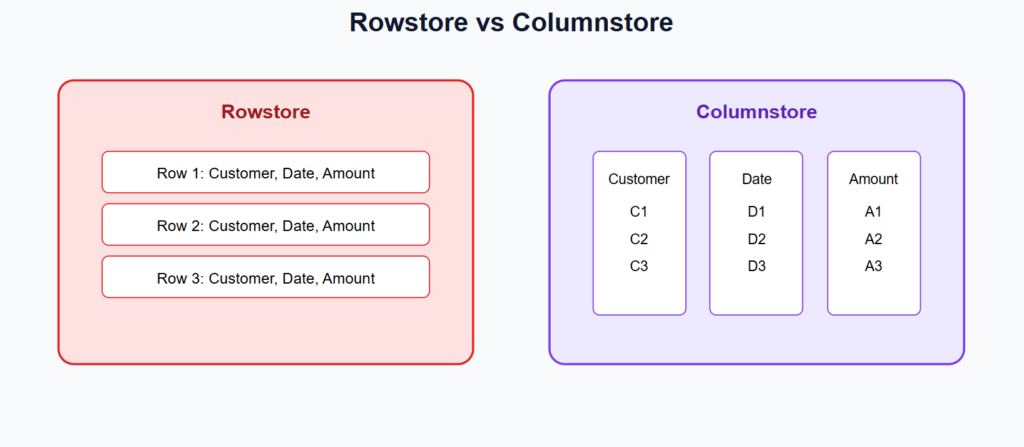
A columnstore index stores data by column instead of by row. This makes it very efficient for analytical queries.
Traditional rowstore indexes are good for transactional systems. Columnstore indexes are better for reporting, dashboards and data warehouses.
Create a clustered columnstore index:
CREATE CLUSTERED COLUMNSTORE INDEX CCI_FactSales
ON dbo.FactSales;Create a nonclustered columnstore index:
CREATE NONCLUSTERED COLUMNSTORE INDEX NCCI_Orders_Analytics
ON dbo.Orders(CustomerId, OrderDate, TotalAmount);Columnstore indexes are useful for:
- reporting,
- dashboards,
- data warehouses,
- large fact tables,
- aggregation queries.
Example:
SELECT CustomerId, SUM(TotalAmount) AS Revenue
FROM dbo.FactSales
WHERE OrderDate >= '2026-01-01'
GROUP BY CustomerId;Microsoft describes columnstore indexes as a standard option for storing and querying large data warehousing fact tables. They can provide significant performance and compression benefits for analytical workloads.
XML Index in SQL Server
SQL Server supports the xml data type. XML indexes improve performance when XML columns are queried frequently.
Example table:
CREATE TABLE dbo.ProductDocuments
(
    ProductDocumentId INT IDENTITY PRIMARY KEY,
    ProductData XML NOT NULL
);Primary XML index:
CREATE PRIMARY XML INDEX PXML_ProductDocuments_ProductData
ON dbo.ProductDocuments(ProductData);Secondary XML index:
CREATE XML INDEX XML_ProductDocuments_Path
ON dbo.ProductDocuments(ProductData)
USING XML INDEX PXML_ProductDocuments_ProductData
FOR PATH;Example query:
SELECT ProductDocumentId
FROM dbo.ProductDocuments
WHERE ProductData.exist('/Product/Name[text()="Motor"]') = 1;XML indexes can improve XML query performance, but they may consume significant storage. They should be used only when XML queries are important for the application.
Microsoft notes that XML indexes can be created on XML data type columns and can index tags, values and paths over XML instances.
Spatial Index in SQL Server
Spatial indexes are used for geometry and geography data types. They help SQL Server process location-based queries.
Example:
CREATE TABLE dbo.Warehouses
(
    WarehouseId INT IDENTITY PRIMARY KEY,
    Name NVARCHAR(100),
    Location GEOGRAPHY
);Create spatial index:
CREATE SPATIAL INDEX SIX_Warehouses_Location
ON dbo.Warehouses(Location);Example distance query:
DECLARE @point GEOGRAPHY =
    GEOGRAPHY::Point(52.2297, 21.0122, 4326);
SELECT Name
FROM dbo.Warehouses
WHERE Location.STDistance(@point) < 50000;Spatial indexes are useful for:
- logistics,
- maps,
- route planning,
- delivery systems,
- warehouse search,
- geofencing.
They are specialized indexes. They are not used for normal text or number searches.
Full-Text Index in SQL Server
A full-text index is used for advanced text search. It supports word-based searching and language-aware queries.
Example:
CREATE FULLTEXT CATALOG ProductCatalog AS DEFAULT;CREATE FULLTEXT INDEX ON dbo.Products
(
Name LANGUAGE 1033,
Description LANGUAGE 1033
)
KEY INDEX PK_Products;Example query:
SELECT ProductId, Name
FROM dbo.Products
WHERE CONTAINS(Description, '"industrial automation"');Another example:
SELECT ProductId, Name
FROM dbo.Products
WHERE FREETEXT(Description, 'PLC integration with SQL Server');A full-text index is often better than this pattern:
WHERE Description LIKE '%automation%'Full-text indexes are useful for:
- product search,
- article search,
- support tickets,
- documentation,
- knowledge bases.
Memory-Optimized Indexes
Memory-optimized tables use special index types. One common type is a hash index.
Hash indexes are very fast for equality searches.
Example:
CREATE TABLE dbo.SessionState
(
    SessionId UNIQUEIDENTIFIER NOT NULL PRIMARY KEY NONCLUSTERED HASH
        WITH (BUCKET_COUNT = 100000),
    UserId INT NOT NULL,
    CreatedAt DATETIME2 NOT NULL
)
WITH (MEMORY_OPTIMIZED = ON, DURABILITY = SCHEMA_AND_DATA);This type of index is useful for:
WHERE SessionId = @SessionIdHash indexes are not good for range queries. For range queries, a memory-optimized nonclustered index is usually better.
Indexed Views in SQL Server
An indexed view stores the result of a view physically. This can improve performance for repeated aggregation queries.
Example:
CREATE VIEW dbo.vCustomerRevenue
WITH SCHEMABINDING
AS
SELECT
    CustomerId,
    COUNT_BIG(*) AS OrderCount,
    SUM(TotalAmount) AS TotalRevenue
FROM dbo.Orders
GROUP BY CustomerId;
GOCREATE UNIQUE CLUSTERED INDEX IX_vCustomerRevenue
ON dbo.vCustomerRevenue(CustomerId);Indexed views are useful when the same expensive aggregation is queried often.
However, indexed views add write overhead. When base tables change, SQL Server must also maintain the indexed view.
Heap Tables
A heap is a table without a clustered index. Data rows are not stored in a specific order.
Example:
CREATE TABLE dbo.ImportBuffer
(
    Id INT,
    RawLine NVARCHAR(MAX),
    ImportedAt DATETIME2
);Heaps can be useful for staging tables and bulk imports. However, for most transactional tables, a clustered index is usually a better choice.
You can find heap tables with this query:
SELECT
    t.name AS TableName,
    i.name AS IndexName,
    i.type_desc
FROM sys.tables t
JOIN sys.indexes i
    ON t.object_id = i.object_id
WHERE i.type_desc = 'HEAP';How to Choose the Right SQL Server Index Type
Choosing the right SQL Server index type depends on the workload.
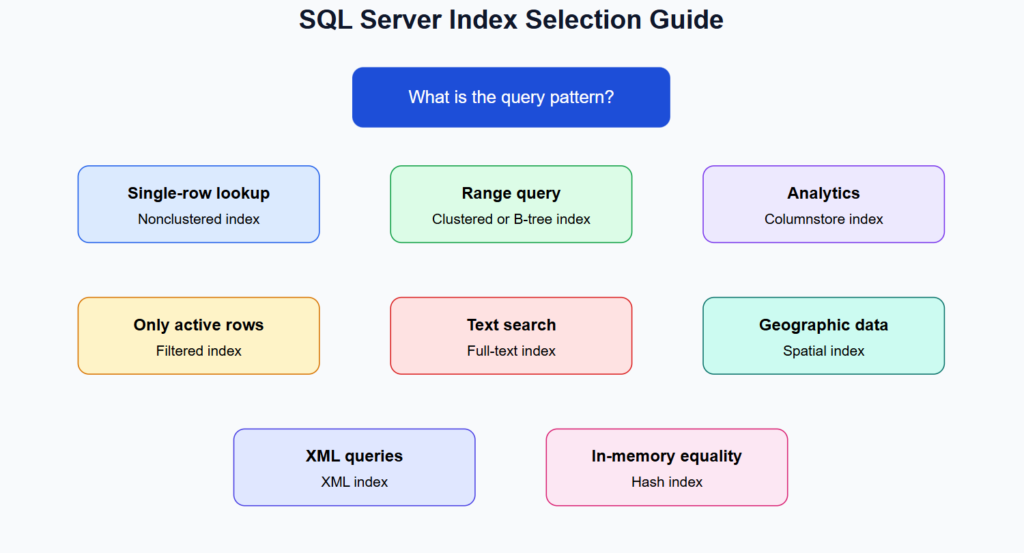
Use this simple guide:
- Use a clustered index for the main access path.
- Use nonclustered indexes for frequent search predicates.
- Use included columns to avoid key lookups.
- Use filtered indexes for small subsets of data.
- Use columnstore indexes for analytics.
- Use full-text indexes for advanced text search.
- Use spatial indexes for location data.
- Use XML indexes only when XML queries are important.
SQL Server Index Maintenance
Indexes need maintenance. Over time, data changes can cause fragmentation and outdated statistics.
Example rebuild:
ALTER INDEX IX_Orders_CustomerId
ON dbo.Orders
REBUILD;Example reorganize:
ALTER INDEX IX_Orders_CustomerId
ON dbo.Orders
REORGANIZE;Example statistics update:
UPDATE STATISTICS dbo.Orders IX_Orders_CustomerId;You can also check index usage:
SELECT
    OBJECT_NAME(i.object_id) AS TableName,
    i.name AS IndexName,
    s.user_seeks,
    s.user_scans,
    s.user_lookups,
    s.user_updates
FROM sys.indexes i
LEFT JOIN sys.dm_db_index_usage_stats s
    ON i.object_id = s.object_id
   AND i.index_id = s.index_id
WHERE OBJECTPROPERTY(i.object_id, 'IsUserTable') = 1;This query helps identify indexes that are used often and indexes that are updated frequently but rarely read.
Common SQL Server Indexing Mistakes
Many performance problems are caused by poor indexing decisions.
Common mistakes include:
- creating too many indexes,
- using wide clustered keys,
- ignoring column order in composite indexes,
- indexing columns that are rarely used,
- forgetting included columns,
- using columnstore indexes for the wrong workload,
- not checking execution plans,
- not maintaining statistics.
The goal is not to create as many indexes as possible. The goal is to create the right indexes for real queries.
FAQ: SQL Server Index Types
What is the most common index type in SQL Server?
The most common index types are clustered and nonclustered indexes. Clustered indexes define the physical order of table data. Nonclustered indexes are separate structures used to find rows efficiently.
Can a SQL Server table have more than one clustered index?
No. A table can have only one clustered index because data rows can be physically ordered in only one way.
What is the difference between clustered and nonclustered indexes?
A clustered index stores the actual data rows at the leaf level. A nonclustered index stores key values and row locators that point to the actual data.
When should I use a filtered index?
Use a filtered index when queries target a specific subset of rows, such as active records, open orders or rows where a column is not null.
When should I use a columnstore index?
Use a columnstore index for analytical workloads, reporting, dashboards and large aggregations. It is usually not the best first choice for small transactional lookups.
Conclusion
SQL Server index types are essential for database performance. Clustered and nonclustered indexes are the foundation of most OLTP systems. Unique indexes enforce data integrity. Composite and covering indexes improve common query patterns. Filtered indexes reduce index size for selected subsets of data. Columnstore indexes are excellent for analytics. XML, spatial, full-text and memory-optimized indexes solve specialized problems.
The best indexing strategy depends on real queries, data volume and write patterns. Good indexes improve performance. Too many indexes increase storage usage and slow down data modifications.
A professional SQL Server indexing strategy should always balance query speed, write performance, storage cost and maintenance effort.
References
- Microsoft Learn — SQL Server Indexes:
https://learn.microsoft.com/en-us/sql/relational-databases/indexes/indexes - Microsoft Learn — SQL Server Index Architecture and Design Guide:
https://learn.microsoft.com/en-us/sql/relational-databases/sql-server-index-design-guide - Microsoft Learn — Clustered and Nonclustered Indexes:
https://learn.microsoft.com/en-us/sql/relational-databases/indexes/clustered-and-nonclustered-indexes-described
More Info
We implement this in real production systems.
If you need help → contact us