Oracle Database offers a wide range of indexing options, and choosing the correct one is one of the most important decisions in database performance tuning. Types of indexes in Oracle are not only about speeding up lookups. In production systems they influence I/O patterns, optimizer decisions, concurrency, storage overhead, maintenance cost, and execution plan stability. A good index can turn a slow full table scan into a quick targeted access path. A bad index can slow down inserts, waste space, or remain unused while still increasing maintenance overhead.
In Oracle, indexing is tightly connected with the cost-based optimizer. The optimizer evaluates statistics, cardinality, selectivity, clustering factor, predicate types, and access costs before deciding whether an index should be used. This means that creating an index is never enough by itself. You also need to understand how Oracle reads an index, when an index scan is cheaper than a table scan, and which type of index fits the workload.
How Indexes Work in Oracle
At a high level, an index is a data structure that helps Oracle find rows faster than scanning the entire table. Most Oracle indexes store two key things:
- the indexed value or values,
- a row locator, usually the
ROWID, pointing to the actual row in the table.
When a query runs, Oracle may choose one of several access paths:
- Index Unique Scan
- Index Range Scan
- Index Full Scan
- Index Fast Full Scan
- Index Skip Scan
- Bitmap Conversion
- Full Table Scan
The choice depends on data distribution and query shape. If a predicate is highly selective, an index is often ideal. If a query returns a large percentage of rows, a full table scan can be cheaper. This is why indexes must be created based on real access patterns rather than intuition alone.
1. B-Tree Index
The B-tree index is the default and most widely used index type in Oracle. It is suitable for OLTP systems, primary keys, unique lookups, range predicates, and most ordinary application queries.
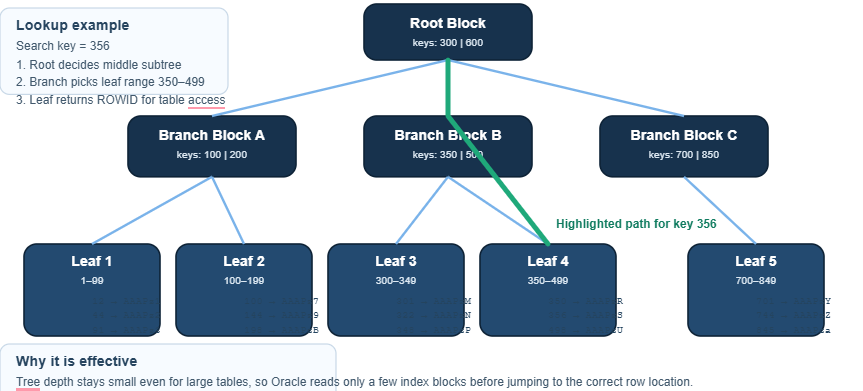
A B-tree index is a balanced tree structure. The path from the root to any leaf is always the same depth, which guarantees predictable navigation cost. Internally, Oracle stores:
- a root block,
- one or more branch blocks,
- leaf blocks containing key values and
ROWIDs.
The leaf blocks are sorted by key, which makes range access efficient.
Where B-tree indexes work best
B-tree indexes are ideal for:
- equality predicates such as
WHERE customer_id = 1001, - range predicates such as
BETWEEN,<,>,>=,<=, - joins on selective columns,
ORDER BYoperations aligned with the index key order,- high-cardinality columns.
Typical SQL
CREATE INDEX idx_orders_customer_id
ON orders(customer_id);SELECT order_id, customer_id, order_date
FROM orders
WHERE customer_id = 1001;Range scan example
CREATE INDEX idx_orders_order_date
ON orders(order_date);SELECT order_id, order_date, total_amount
FROM orders
WHERE order_date BETWEEN DATE '2025-01-01' AND DATE '2025-03-31';Detailed SVG: B-Tree Index Structure and Lookup Path
Important remarks
B-tree indexes are usually the first choice for transaction-oriented systems. However, they are not a universal solution. If a query returns a large percentage of the table, Oracle may prefer a full table scan. Likewise, indexing a low-cardinality column such as status in a busy OLTP table often gives poor results.
2. Bitmap Index
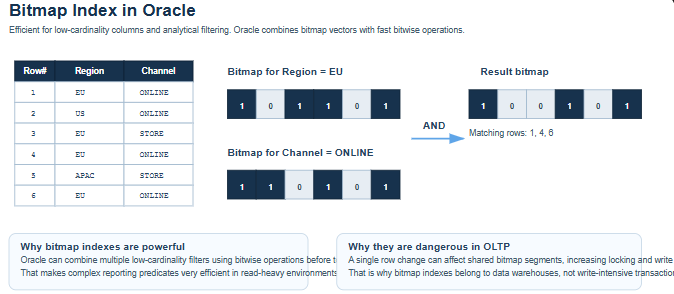
A bitmap index stores bitmaps instead of a tree of row locators per key. For each distinct value, Oracle builds a bit vector where each bit corresponds to a row or row range. This makes bitmap indexes extremely effective in read-heavy analytical systems, especially where multiple low-cardinality filters are combined.
Bitmap indexes are common in data warehouses, reporting systems, and star schemas. They are not suitable for high-DML OLTP workloads because updates can affect many bits and increase locking overhead.
Best use cases
Bitmap indexes work best for:
- low-cardinality columns,
- reporting and analytics,
- ad hoc filtering on many dimensions,
- queries that combine predicates with
ANDandOR.
SQL example
CREATE BITMAP INDEX idx_sales_region
ON sales(region);CREATE BITMAP INDEX idx_sales_channel
ON sales(channel);SELECT COUNT(*)
FROM sales
WHERE region = 'EU'
AND channel = 'ONLINE';Detailed SVG: Bitmap Index and Bitmap AND Operation
Practical note
Bitmap indexes are often misunderstood because they look attractive on paper. In analytical workloads they can be excellent. In OLTP systems they are usually the wrong choice.
3. Unique Index
A unique index guarantees that indexed values are unique. Oracle automatically creates a unique index for primary key and unique constraints unless an appropriate index already exists.
SQL example
CREATE UNIQUE INDEX idx_customers_email
ON customers(email);Constraint example
ALTER TABLE customers
ADD CONSTRAINT uq_customers_email UNIQUE (email);When to use
Use unique indexes for:
- natural business keys,
- email addresses, tax IDs, external identifiers,
- columns that must never contain duplicates.
The main benefit is not only performance but also data integrity. Oracle can perform an Index Unique Scan, which is one of the most efficient access paths because the database knows that at most one row can match.
4. Composite Index
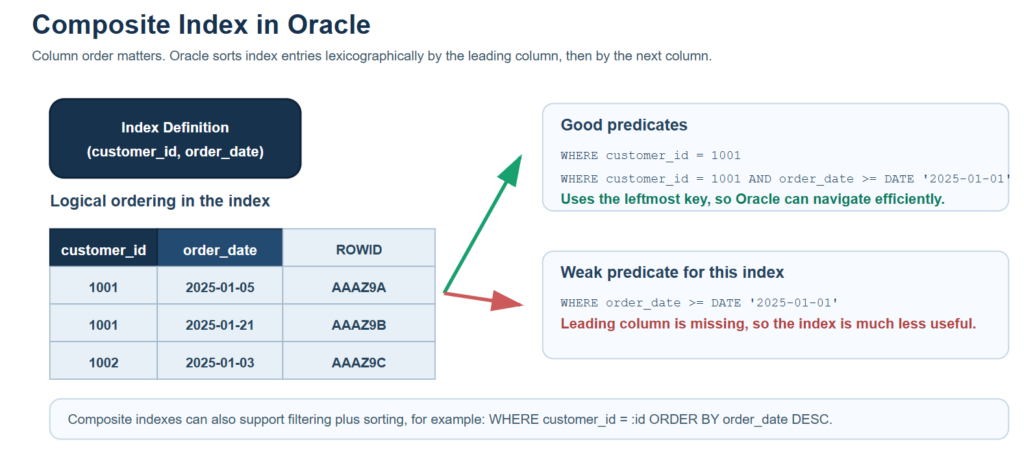
A composite index contains more than one column. Oracle stores the columns in the specified order, and that order is critical. Composite indexes are one of the most important tools in real production tuning because many queries filter or sort by multiple attributes.
Leftmost prefix rule
If you create:
WHERE customer_id = :id
WHERE customer_id = :id AND order_date >= :dOracle can efficiently use this index for:
WHERE customer_id = :id
WHERE customer_id = :id AND order_date >= :dBut not efficiently for:
WHERE order_date >= :dbecause customer_id is the leading column.
Detailed SVG: Composite Index and Leftmost Prefix Rule
Practical design advice
Composite indexes should reflect real query patterns, not just a list of popular columns. The best order is usually:
- the most commonly filtered leading column,
- then additional filtering columns,
- then columns that help sorting or reduce table lookups.
5. Function-Based Index
A function-based index indexes the result of an expression instead of the raw column value. This is essential when queries apply a function in the predicate and would otherwise prevent normal index usage.
Common example
Without a function-based index:
SELECT *
FROM customers
WHERE UPPER(last_name) = 'SMITH';a regular index on last_name may not be usable efficiently, because Oracle sees UPPER(last_name) as an expression.
Solution
CREATE INDEX idx_customers_upper_last_name
ON customers(UPPER(last_name));Other useful examples
CREATE INDEX idx_orders_year
ON orders(EXTRACT(YEAR FROM order_date));CREATE INDEX idx_accounts_trimmed_code
ON accounts(TRIM(account_code));Detailed SVG: Function-Based Index Transformation
Key point
Function-based indexes are extremely useful, but you should use them only when the expression appears consistently in real queries. Otherwise, you are adding maintenance cost for little gain.
6. Reverse Key Index
A reverse key index reverses the bytes of each indexed value before storing it. The classic use case is a sequence-based primary key in a high-concurrency insert workload.
Why this matters
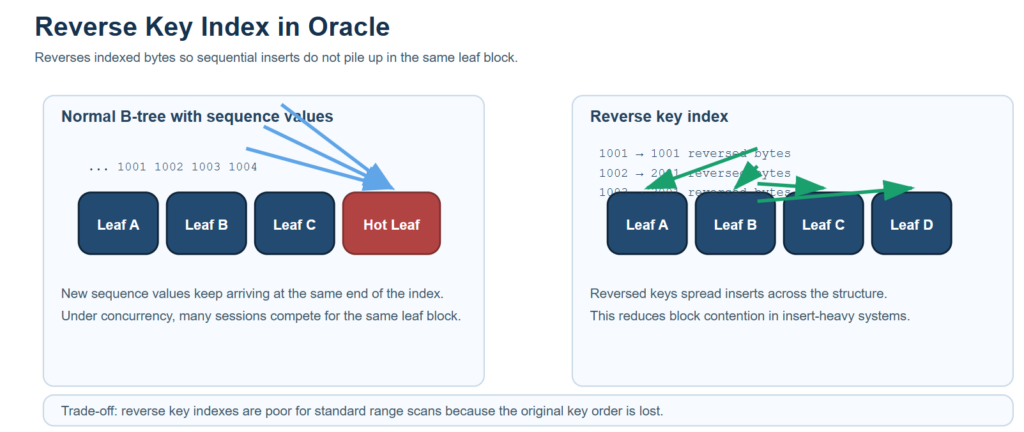
In a normal B-tree index, sequential values like 1001, 1002, 1003 are inserted near the same end of the tree. In a busy system, many sessions insert into the same leaf block, which can create a hotspot.
A reverse key index spreads inserts across the structure more evenly.
SQL example
CREATE INDEX idx_orders_pk_reverse
ON orders(order_id) REVERSE;Trade-off
Reverse key indexes are good for equality lookups, but not for normal range scans, because the natural order is destroyed.
Detailed SVG: Composite Index and Leftmost Prefix Rule
7. Index-Organized Table (IOT)
Detailed SVG: Normal Sequential Inserts vs Reverse Key Distribution
An index-organized table stores the table data directly in a B-tree structure instead of using a heap table plus a separate primary key index. In other words, the table itself is organized by its primary key.
SQL example
CREATE TABLE customers_iot (
customer_id NUMBER PRIMARY KEY,
customer_name VARCHAR2(100),
city VARCHAR2(50)
)
ORGANIZATION INDEX;Benefits
IOTs are useful when:
- data is primarily accessed by primary key,
- you want to avoid an extra table lookup,
- the table is compact and key-driven,
- storage efficiency matters.
Limitation
They are less attractive when access patterns depend heavily on non-key columns or when the primary key is wide and volatile.
8. Partitioned Index
A partitioned index divides the index into smaller, more manageable units. This is especially useful for very large tables. In Oracle, indexes can be:
- local partitioned, aligned with table partitions,
- global partitioned, spanning the entire table independently of table partition boundaries.
Local index example
CREATE INDEX idx_sales_customer_global
ON sales(customer_id)
GLOBAL;Global index example
CREATE INDEX idx_sales_customer_global
ON sales(customer_id)
GLOBAL;Why partitioned indexes matter
Partitioning improves:
- maintenance operations,
- scalability,
- partition pruning,
- manageability in very large tables.
A query restricted to one time range can often touch only one partition rather than the full index.
9. Invisible Index
An invisible index exists physically but is ignored by the optimizer unless explicitly enabled for testing. This is a very useful feature when you want to see whether an index is still needed without dropping it immediately.
SQL example
ALTER INDEX idx_orders_customer_id INVISIBLE;You can later make it visible again:
ALTER INDEX idx_orders_customer_id VISIBLE;This is particularly valuable in cleanup projects where old schemas contain many indexes and you want to validate real dependency safely.
10. Compressed Index
A compressed index reduces storage usage by compressing repeated prefix values. This is particularly useful in large composite indexes where the leading columns repeat often.
SQL example
CREATE INDEX idx_orders_comp
ON orders(customer_id, status, order_date)
COMPRESS 2;This means Oracle compresses repeated prefixes for the first two indexed columns.
When to use
Use index compression when:
- leading columns repeat frequently,
- the index is large,
- storage and buffer efficiency matter.
Compression can reduce index size significantly and sometimes improve cache behavior, but it must be tested because CPU overhead may rise slightly.
11. Domain Index
A domain index is a specialized extensible index type created through Oracle’s extensibility framework. It is used for non-standard search scenarios such as full-text search, spatial indexing, or custom data types.
Oracle Text example
CREATE INDEX idx_docs_text
ON documents(content)
INDEXTYPE IS CTXSYS.CONTEXT;Use cases
Domain indexes are appropriate when normal B-tree or bitmap structures cannot model the search efficiently. Typical examples include:
- full-text search,
- GIS and spatial operations,
- multimedia or custom object searches.
Reading Execution Plans
Creating indexes without reading execution plans is guesswork. In Oracle, the key step is to inspect how the optimizer actually uses the structure.
Example
EXPLAIN PLAN FOR
SELECT order_id, customer_id
FROM orders
WHERE customer_id = 1001;SELECT * FROM TABLE(DBMS_XPLAN.DISPLAY);Possible results include:
INDEX UNIQUE SCANINDEX RANGE SCANTABLE ACCESS BY INDEX ROWIDBITMAP INDEX SINGLE VALUEFULL TABLE SCAN
If the plan shows a full table scan when you expected index usage, the causes may include stale statistics, poor selectivity, missing leading columns in a composite index, or simply the optimizer deciding that the scan is cheaper.
Statistics Matter
Oracle’s optimizer relies heavily on statistics. Without accurate statistics, even a well-designed index can be ignored.
Gather statistics
BEGIN
DBMS_STATS.GATHER_TABLE_STATS(
ownname => 'SALES_APP',
tabname => 'ORDERS'
);
END;
/For partitioned or very large tables, statistics strategy becomes even more important. Histograms may also matter when data distribution is skewed.
Common Indexing Mistakes
The most common mistakes in Oracle indexing are not technical syntax issues. They are design mistakes:
1. Indexing every searchable column
This increases DML overhead and rarely produces good plans.
2. Ignoring query patterns
Indexes should support real filters, joins, and sort orders.
3. Using bitmap indexes in OLTP
This often leads to locking and update problems.
4. Wrong composite index order
Column order determines usability.
5. Ignoring clustering factor
A poor clustering factor can make index access expensive even when the predicate is selective.
6. Forgetting function-based indexes
If queries consistently apply expressions, a raw-column index may not help.
Practical Decision Guide
Use this quick logic in production:
- Need fast equality or range lookup in OLTP? Use B-tree.
- Need uniqueness enforcement? Use unique index.
- Need multi-column filtering or sorting? Use composite index.
- Need filtering on expressions? Use function-based index.
- Need low-cardinality analytics? Use bitmap index.
- Need to reduce sequence hot blocks? Use reverse key index.
- Need huge-scale partition alignment? Use partitioned index.
- Need primary-key-driven table storage? Consider IOT.
- Need safe testing before removal? Use invisible index.
- Need text or spatial search? Use domain index.
Conclusion
Oracle indexing is a performance engineering topic, not just a DDL topic. The right index depends on workload, cardinality, concurrency, query shape, maintenance cost, and optimizer behavior. B-tree indexes remain the standard choice for most transactional systems, but Oracle offers many specialized structures for cases where default indexing is not enough.
The most effective indexing strategy is always grounded in evidence:
- actual SQL patterns,
- real execution plans,
- accurate statistics,
- measured workload characteristics.
If you design indexes this way, Oracle can perform extremely efficiently even at large scale.
SQL Summary Examples
-- B-tree
CREATE INDEX idx_orders_customer_id
ON orders(customer_id);-- Unique
CREATE UNIQUE INDEX idx_customers_email
ON customers(email);-- Composite
CREATE INDEX idx_orders_customer_date
ON orders(customer_id, order_date);-- Function-based
CREATE INDEX idx_customers_upper_last_name
ON customers(UPPER(last_name));-- Bitmap
CREATE BITMAP INDEX idx_sales_region
ON sales(region);-- Reverse key
CREATE INDEX idx_orders_pk_reverse
ON orders(order_id) REVERSE;-- Partitioned
CREATE INDEX idx_sales_order_date_local
ON sales(order_date) LOCAL;-- Invisible
ALTER INDEX idx_orders_customer_id INVISIBLE;-- Compressed
CREATE INDEX idx_orders_comp
ON orders(customer_id, status, order_date) COMPRESS 2;References
https://docs.oracle.com/en/database/oracle/oracle-database/19/admin/managing-indexes.html
More info
We implement this in real production systems.
If you need help → contact us